
Views are used on List Pages to define different ways of organizing data. Instead of creating a new custom page to reorganize the data, you could create a View that will rearrange the columns. The great thing about creating a view via AL code is that it is available to all users.
The real benefits of Views:
- You can change the filters that are used
- Sort on different fields
- Make layout changes (hiding and moving columns)
Views can be created as part of Pages or even as a Page Extension. The views are available through the FilterPane on a page, and are displayed in the order they are created via code.
pageextension 70103 "TBM_CustomerLedgerEntries" extends "Customer Ledger Entries"
{
    views
    {
        addfirst
        {
            view(OpenInvoices)
            {
                Caption = 'Open Invoices';
                SharedLayout = false;
                Filters = where("Document Type" = filter(Invoice), Open = const(true));
                OrderBy = descending("Posting Date", "Customer No.");
                layout
                {
                    moveafter("Customer Name"; "Due Date")

                    modify("Currency Code")
                    {
                        Visible = false;
                    }
                }
            }
            view(YTDPayments)
            {
                Caption = 'YTD Payments';
                SharedLayout = false;
                Filters = where("Document Type" = filter(Payment), "Posting Date" = filter('CY-1Y+1D..'));
                OrderBy = descending("Posting Date", "Customer No.");

                layout
                {
                    modify("Document Type")
                    {
                        Visible = false;
                    }
                    modify("Document No.")
                    {
                        Visible = false;
                    }
                }
            }
        }
    }
}
Standard Customer Ledger Entries column layout

Open Invoices view

You can see that the first view defined via code is displayed after All (which is the default layout for the page). The Due Date was moved after the Customer Name, and we removed the Currency Code.
YTD Payments view
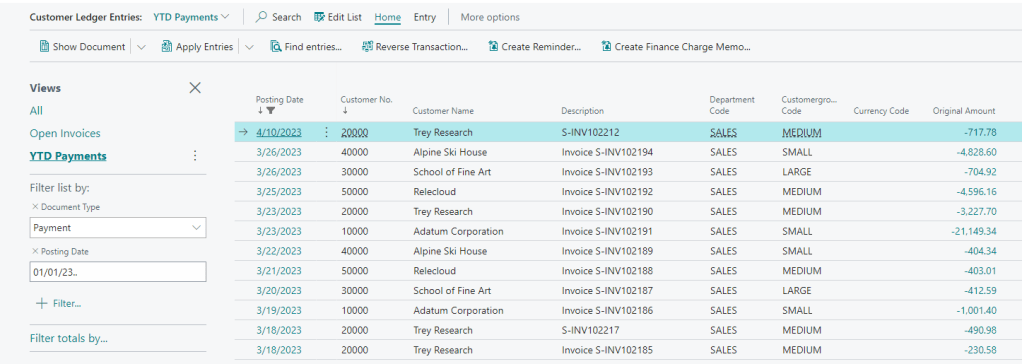
With this view, we hid the Document Type column, as they are all Payments. We also hid the Document No. since it’s also included in the Description. One other notable feature of this view is we used a Date Formula for the Posting Date.
Filters = where(“Document Type” = filter(Payment), “Posting Date” = filter(‘CY-1Y+1D..’));
The filters are then pulling Payments made year to date.
Limitations
You cannot use variables or methods in a view. This means Visibility properties can only use constant values or field references.
You cannot create new controls for a page from a view.
You cannot specify a custom view to be used when opening the page.
#msdyn365bc #bcdevelopment
 BC Development Notebook