

I recently had the pleasure of sitting down with Mary Myers, MVP and Chief Maximizer at WorldMax to start teaching her some of the basics of AL Development within VS Code. Any time you get to chat with Mary is a treat, especially when you get to share your love of developing for Business Central. Mary knows Business Central business logic, and she’s a sorceress when it comes to Power Platform integrations, but she is not an AL developer. Throughout her day to day work she’s improved her productivity by leveraging AI, so before our meeting she asked ChatGPT for some help. Mary knew enough technical lingo to formulate the following question:
Can you write me a procedure for a business central event that only looks for when a vendor’s street, city, or state has been changed

At this point, Mary knew enough about AL Development to know that this wasn’t correct and that she wanted to use an event, so she asked a follow up question
what would I need to do with this code to publish it as an event in business central
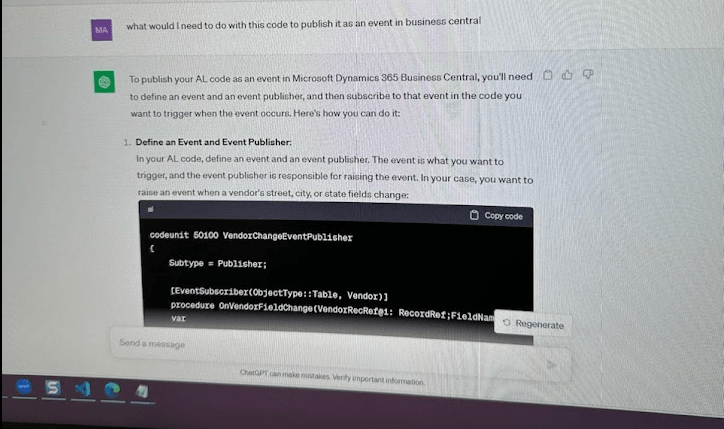

The concepts are correct, but it really is a dirty trick for someone not familiar with coding in AL, as the code will not compile. I took the time to explain the logic behind what the code is trying to achieve – how she would have to subscribe to the OnAfterValidate of the Address, City and State (which is the County field in Business Central). Once you had all of the events created, you could then call a procedure that you would write to handle the business logic associated with updating these three fields.
We were then talking about how tricky it is to get started with learning something new, and even harder when you don’t have a clear path to the right answer. We were talking about some of the great extensions available in VS Code to help with AL development; extensions that give you code snippets or can help clean up your code. I was then wondering how GitHub Copilot would respond to Mary’s question. (I will preface that I did reword it in our working session, so that may have affected my answer).
Can you create an event subscriber for the Vendor Card when the city, state or zip code changes?
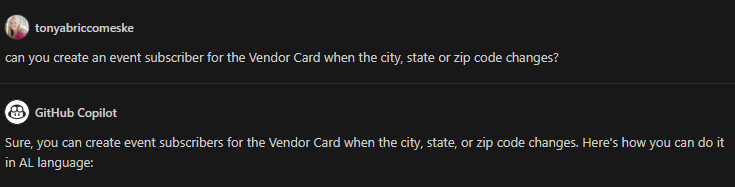
Here is the code provided. This is a lot closer to the response I would expect as an AL developer. The only thing you would have to change is the field names so they match the Vendor table in Business Central.
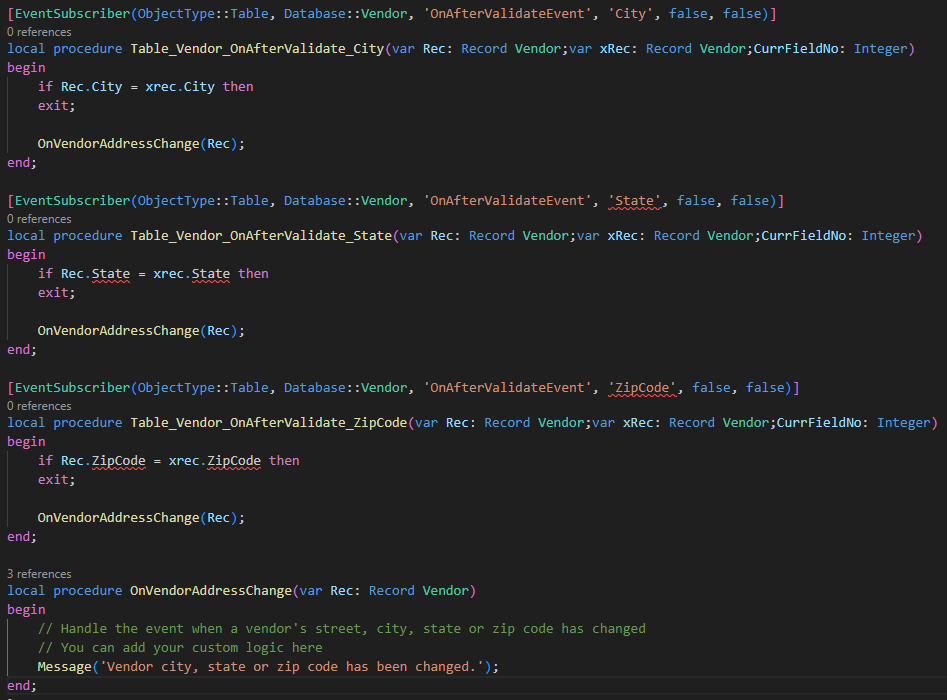
Copilot also went on to explain “this code will trigger the OnVendorAddressChange procedure whenever the city, state or zip code of a vendor change.”
Mary and I then started chatting about why GitHub Copilot gave me such a different answer from the answer(s) she received from ChatGPT. I have been using GitHub Copilot for a few months now, so my AI companion has been learning from the code I have been writing. Since Mary is just getting started on her AL Development journey in VS Code she didn’t have a GitHub Copilot subscription to see if she would get a different response. So I asked another developer to ask their Copilot the same exact question, and they received a different response.

This has us completely confused, because we work on similar projects, have the same coding standards and similar coding styles. My only thought is that my copilot picked up on what Mary and I were working on in my VS Code, whereas my developer friend wasn’t actively working with Vendor events, so it took a more literal approach. As you can see from my friends screenshot, their event is targeting the Vendor Table OnAfterModify.
As we continue to work with AI tools, I think we need a little context as to where they are getting their information from. I know that CentralQ.ai is an AI search built on top of the collective knowledge of the Business Central community. (You can even see a list of the sources where it is pulling data from). Dmitry Kaston, the creator of CentralQ.ai, specifically trained this AI to look at very specific sources from the Business Central community.
So I went to ChatGPT and asked How do ChatGPT and GitHub Copilot differ in how they collect information in assisting me with AL development?
Their purpose is different. ChatGPT is a conversational AI, and while AI is used to answer questions, ChatGPT is more for generating text, and doesn’t have direct integration with code development. GitHub Copilot is your coding companion; It was designed to assist developers in writing code, specifically within code editors, by providing code suggestions, autocompletions, and code generation.
The way that they collect information is different. According to ChatGPT, it doesn’t actively collect information from external sources. It primarily assists through text-based conversations by answering questions or explaining concepts. Copilot has access to open-source repositories on GitHub, and also learns from user-specific patterns and preferences. Many community members have open-source projects on GitHub that help your little shadow learn about coding for AL. ✨ Did you know that the source code of Microsoft Dynamics 365 Business Central is actually open-source on GitHub? So it’s only safe to assume GitHub Copilot is learning from the base app, meaning if you are looking for some coding assistance, GitHub Copilot should be your sidekick.
One more thing to think about…. Dmitry Katson shared this slide from #DirectionsEMEA, a Business Central Conference currently taking place in Lyon, France.
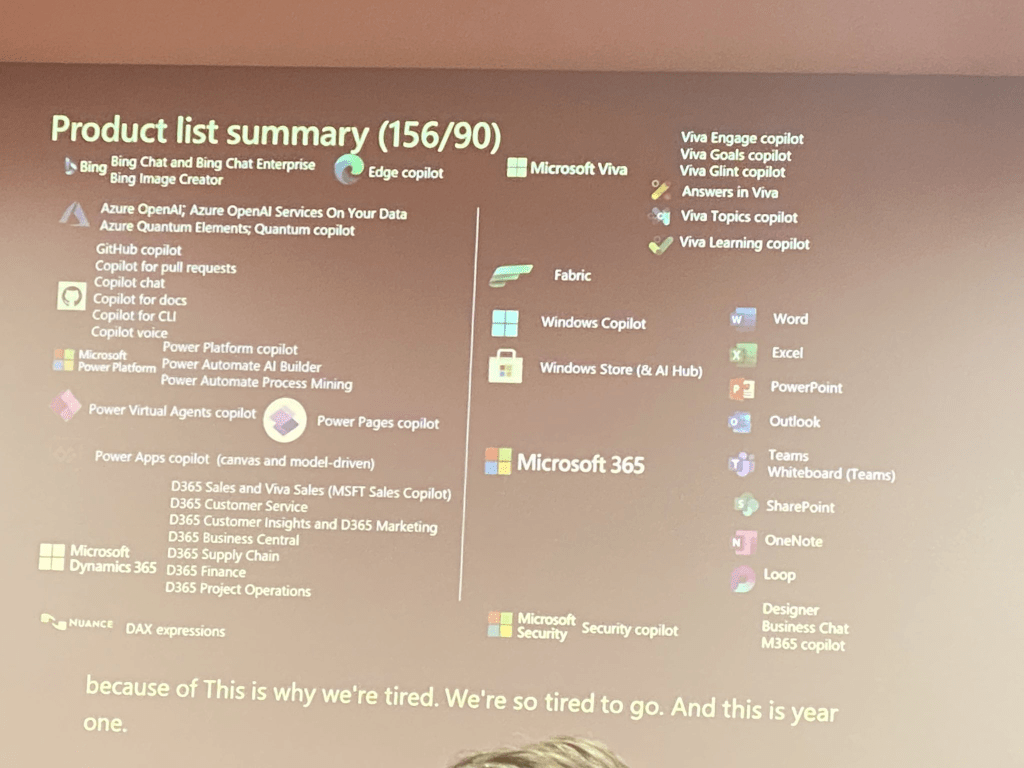
Microsoft released 156 copilots this year 😅😳 pic.twitter.com/Z9tACpstxh— Dmitry Katson (@DmitryKatson) November 1, 2023
Microsoft has released 156 Copilots, meaning one hundred and fifty-six different AI tools to assist their users. 🥳 At this point the question shouldn’t be if you are using AI, it should be which AI is the best tool for the task you are trying to accomplish. I think you can relate picking an AI tool to picking the right ERP system. It’s not a one size fits all. There isn’t one superior system or AI. They all have their bugs, and as always, the conversation of AI and development is always changing. Ii you are a developer, I would suggest getting a GitHub Copilot subscription to assist you on your coding journey, and check out some of the other AI tools available. I also think we need to remember that AI is here to assist us and make things a little easier, but we always need to do our due diligence and proofread/test the solutions that are being provided.
#msdyn365bc #businesscentral #AI #ChatGPT #Copilot
 BC Development Notebook