

Connecting Excel to Business Central is getting even easier in the 2024 wave 2 release (BC25). The biggest change from my original blog post – no more hardcoding Tenant Ids, and we even have some help with named formulas to make development even faster!
Within the hidden Aggregated Metadata sheet there are four tables. The ReportRequestValues table has a new key TenantEntraId, which is used for identifying which tenant we are connecting to. By having this value available, this makes it possible to use the same Excel Report in different tenants, and being able to load the layout through an app install! This makes reports more reusable, because as soon as it’s installed its ready to use! Microsoft even made connections easier by removing the curly braces from around the Company Id. You can see the differences between BC24 and BC25 below.


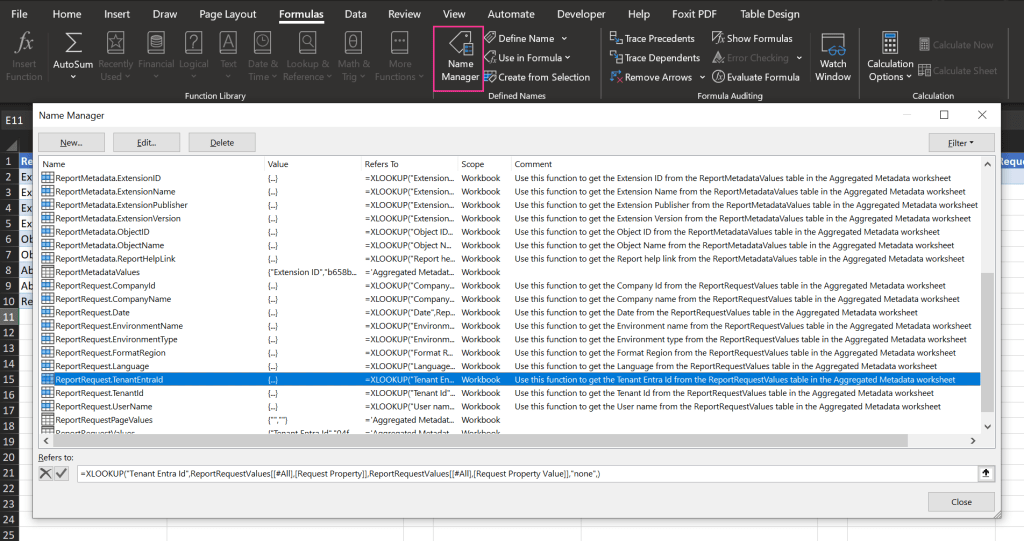
One other new addition in BC25 Excel Report Layouts are named formulas. Microsoft added these formulas so we don’t have to write complex XLookups or formulas. To view these formulas, within the ribbon click the tab for Formulas > Name Manager. In the screenshot below you can see the new named formula for ReportRequest.TenantEntraId
I like to use PowerQuery within Excel to transform the data before it’s loaded for users to interact with in Excel. So when we are connecting to Business Central, this is what our connection will look like.
We will create variables to hold values from the tables that are part of the Aggregated Metadata, and then use those to build out the complete URI to call the API. We can easily get the following values that relate to when the report was run from Business Central.
1. EnvironmentName
2. TenantEntraId
3. CompanyId
let
    EnvironmentName = Excel.CurrentWorkbook(){[Name="ReportRequest.EnvironmentName"]}[Content]{0}[Column1],
    TenantEntraId = Excel.CurrentWorkbook(){[Name="ReportRequest.TenantEntraId"]}[Content]{0}[Column1],
    CompanyId = Excel.CurrentWorkbook(){[Name="ReportRequest.CompanyId"]}[Content]{0}[Column1],
    Source = OData.Feed("https://api.businesscentral.dynamics.com/v2.0/"&TenantEntraId &"/"& EnvironmentName &
            "/api/bcdevnotebook/reporting/v2.0/companies("& CompanyId & ")/salesInvoices", null, [Implementation="2.0"])
in
    Source
If you wanted to use a parameter from the users, like the SalesInvoiceNo, you would just do something like this:
SalesInvoiceNo = Excel.CurrentWorkbook(){[Name="ParamTable"]}[Content]{0}[Value]
and just add on as a filter at the end of the URL like this
Source = OData.Feed("https://api.businesscentral.dynamics.com/v2.0/"&TenantEntraId &"/"& EnvironmentName & "/api/v2.0/companies("& EncodedCompany &")/salesInvoices?$filter=number eq '" & SalesInvoiceNo & "'", null, [Implementation="2.0"])
It’s pretty exciting to see how Microsoft is continuing to evolve our reporting capabilities within Business Central. Please let me know if you have used an Excel Report Layout with APIs. It’s pretty nifty!
#msdyn365bc #BusinessCentral #Reporting #excelReporting
 BC Development Notebook
[…] [NOTE]: This blog post was written before the release of BC25 (2024 release wave 2). Extensive improvements have been made to make connecting to APIs through Excel Report Layouts easier. So if you are working with BC25, please check out this blog post […]
LikeLike
[…] How could we improve this query usage? We could add the Shipment Date, and filter for orders shipping today, or this week. Maybe we need to know orders shipping for a specific carrier. Take this one step further – you could expose a query as an API, and pull that data into Excel for a Refreshable Excel Report. […]
LikeLike
[…] via OData, which underpins the Power Query connection used in refreshable Excel reports. 📖 Blog: Business Central Refreshable Excel Reports in BC25 – BC Dev Notebook — Tonya’s own deep-dive post covering the BC25 improvements to refreshable reports, […]
LikeLike