

Now that you are using a Query object to collect your data for report development, you are probably wondering how do you leverage a request page so users can retrieve the relevant data. This blog post is going to show you how to leverage a System Application Library, Codeunit 46 SelectionFilterManagement.
Let’s start with understanding how to work with codeunit 46 SelectionFilterManagement
If we are starting from a list page where the user has selected records to process a report with, we can use CurrPage.SetSelectionFilter(RecordVar). We are passing through a variable for the Record to collect the “marked” records. We will then pass it to SelectionFilterManagement, calling GetSelectionFilter(). This procedure takes a RecRef, and the field we want to filter on.
If you are attending Directions North America April 7 – 9, 2025, here’s a preview from my session with Henrik Helgesen “AL Language Evolution: Techniques for Modern Developers”. Code for this session can be found in this repository.
We have a custom Cat Table, and we want to print the related Cat Profile reports. From the Cats List Page, we will get the selected Cat records. We are then going to set a filter on the No. by getting the selection filter. (So if the user selects more than one cat, we can easily filter the records). We will then pass that filtered record to the report to print.

You can examine the SelectionFilterManagement codeunit (for version BC25) here.
Let’s get back to working with Queries
If we look at the Overdue Customer Invoices report we built in a previous blog post, where we have query object populating the dataset, we need a way for the users to get the selected customers and print a collection of their overdue invoices.
The code looks a little different because the SelectionFilterManagement codeunit has a bunch of prebuilt procedures to get master records filtered datasets.
As you can see, we are just calling GetSelectionFilter() from the Customer List page. No need for us to handle getting the RecRef, as it’s all pre-built and reusable.


We then call a procedure on the report to SetCustomerFilter, which sets a global text variable we can use to filter the query.

We will finally set the filter on the query within the OnPreDataItem trigger of the Integer dataitem, right before we open the query.
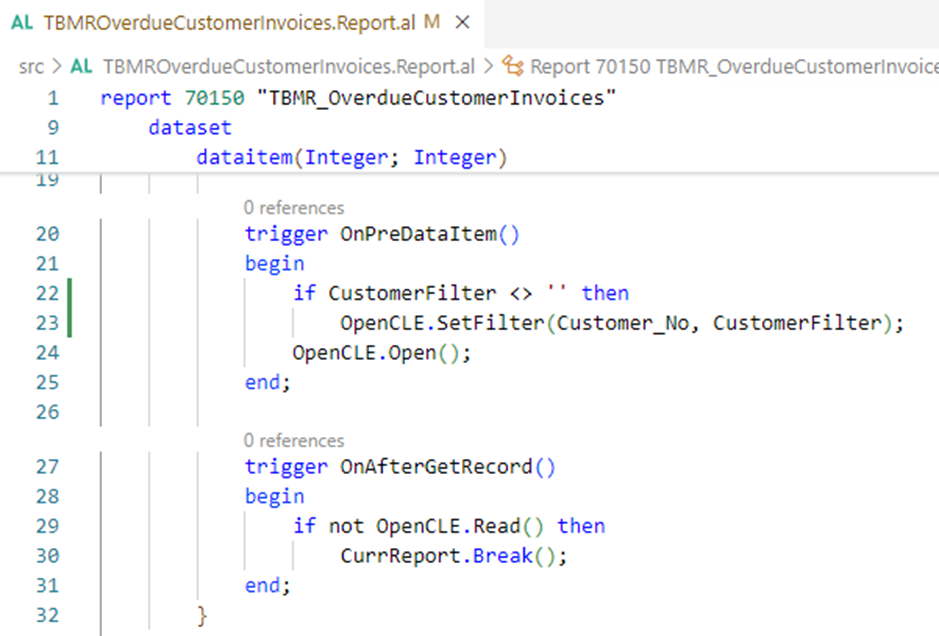
Using a query to populate the report data does have its limitations, as you are limiting the users to only the filters that are handled via code.
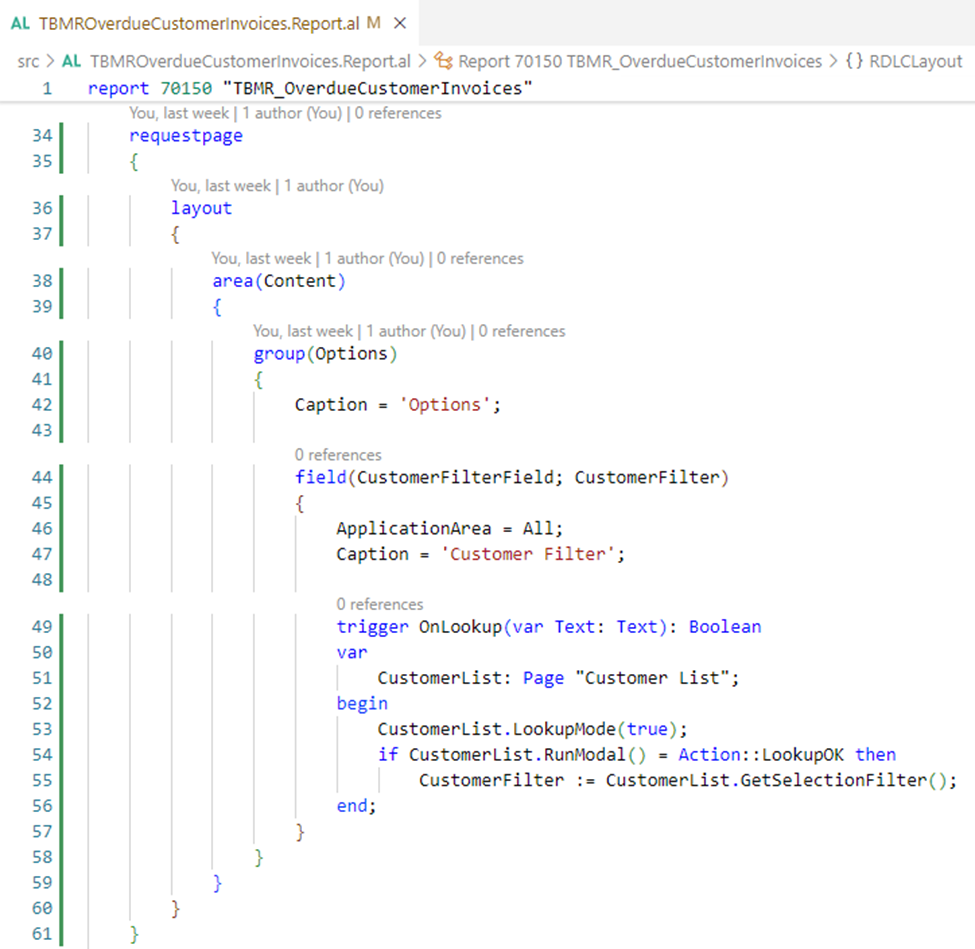
You may also be wondering what if the users run the report directly, instead of from a list page? There is no data item to set RequestFilterFields with when you are using a query to collect the data.
This is also where the SelectionFilterManagement Codeunit also comes in handy! We are going to add a field to the Report Request Page for the CustomerFilter. We then leverage the Customer List page in Lookup mode, and based on the selection made, pass it again to SelectionFilterManagement, and set the filter on the report.
I’m hoping that the techniques shared in this blog post are helpful, and you are able to implement them throughout much of your AL development. I use the SelectionFilterManagement codeunit quite frequently, and have been always using it to filter my reports when using a query.
Did you find this helpful? I’m looking forward to continuing the conversation in Vegas in April! You can hear more about queries, and working with SelectionFilterManagement in BOTH of my sessions.

Additional Resources
Yun Zhu’s blog post “How to get a filter for the selected records on any page”
Erik Hougaard has a video on how to implement multi-select with SelectionFilter
You can see related code samples from this post here
 BC Development Notebook