

Have you ever seen a custom Sales Line field’s data just disappear? You sit there wondering why is that getting cleared out.
There is a procedure on the Sales Header RecreateSalesLines() that deletes and rebuilds all lines for the document after key header changes. It copies existing lines into temporary tables, validates header-driven changes, and then re-inserts lines via CreateSalesLine().
From the Sales Header, there are several fields that trigger recreating Sales Lines.
- Sell-to Customer No.
- This triggers downward revalidation of Currency and Posting Groups
- Bill-to Customer No.
- Ship-to Code
- When the VAT or Tax Area changes
- Gen. Bus. Posting Group
- VAT Bus. Posting Group
- Responsibility Center
- Currency Code
So you may be wondering what is happening to your custom field data. When the Sales Line is (re)created, only the default fields are copied over and revalidated.
- Type
- No.
- Description / Description 2
- Unit of Measure Code
- Variant Code
- Quantity (if ShouldValidateQuantity = true)
- Purchase Order No.
- Purchase Order Line No.
- Drop Shipment
- Shipment Date
Code from Sales Header – CreateSalesLine()
    local procedure CreateSalesLine(var TempSalesLine: Record "Sales Line" temporary)
    var
        IsHandled: Boolean;
        ShouldValidateQuantity: Boolean;
    begin
        OnBeforeCreateSalesLine(TempSalesLine, IsHandled, Rec, SalesLine);
        if IsHandled then
            exit;

        SalesLine.Init();
        SalesLine."Line No." := SalesLine."Line No." + 10000;
        SalesLine."Price Calculation Method" := "Price Calculation Method";

        OnCreateSalesLineOnBeforeAssignType(SalesLine, TempSalesLine, Rec);
        SalesLine.Validate(Type, TempSalesLine.Type);
        OnCreateSalesLineOnAfterAssignType(SalesLine, TempSalesLine);
        if TempSalesLine."No." = '' then begin
            SalesLine.Description := TempSalesLine.Description;
            SalesLine."Description 2" := TempSalesLine."Description 2";
        end else begin
            SalesLine.Validate("No.", TempSalesLine."No.");
            OnCreateSalesLineOnAfterValidateNo(SalesLine, TempSalesLine);

            if SalesLine.Type <> SalesLine.Type::" " then begin
                OnCreateSalesLineOnBeforeTransferFieldsFromTempSalesLine(SalesLine, TempSalesLine, Rec);
                SalesLine.Validate("Unit of Measure Code", TempSalesLine."Unit of Measure Code");
                SalesLine.Validate("Variant Code", TempSalesLine."Variant Code");
                ShouldValidateQuantity := TempSalesLine.Quantity <> 0;
                OnCreateSalesLineOnBeforeValidateQuantity(SalesLine, TempSalesLine, ShouldValidateQuantity);
                if ShouldValidateQuantity then begin
                    SalesLine.Validate(Quantity, TempSalesLine.Quantity);
                    SalesLine.Validate("Qty. to Assemble to Order", TempSalesLine."Qty. to Assemble to Order");
                end;
                SalesLine."Purchase Order No." := TempSalesLine."Purchase Order No.";
                SalesLine."Purch. Order Line No." := TempSalesLine."Purch. Order Line No.";

                IsHandled := false;
                OnCreateSalesLineOnBeforeSetDropShipment(SalesLine, TempSalesLine, IsHandled);
                if not IsHandled then
                    SalesLine."Drop Shipment" := TempSalesLine."Drop Shipment";
            end;

            IsHandled := false;
            OnCreateSalesLineOnBeforeValidateShipmentDate(SalesLine, TempSalesLine, Rec, IsHandled);
            if not IsHandled then
                SalesLine.Validate("Shipment Date", TempSalesLine."Shipment Date");
        end;
        OnBeforeSalesLineInsert(SalesLine, TempSalesLine, Rec);
        SalesLine.Insert();
        OnAfterCreateSalesLine(SalesLine, TempSalesLine);
    end;
The key piece missing in this code is a call to TransferFields. So if you have a custom field that is getting populated – say via an integration instead of validation of one of these other key fields – your field value doesn’t get copied when the Sales Line is recreated.
Fear not – all you need to do is subscribe to one event to maintain your existing value!
Event Subscriber – Table “Sales Header” OnCreateSalesLineOnBeforeTransferFieldsFromTempSalesLine
    [EventSubscriber(ObjectType::Table, Database::"Sales Header", OnCreateSalesLineOnBeforeTransferFieldsFromTempSalesLine, '', false, false)]
    local procedure Table_SalesHeader_OnCreateSalesLineOnBeforeTransferFieldsFromTempSalesLine(var SalesLine: Record "Sales Line";
                        var TempSalesLine: Record "Sales Line" temporary; var SalesHeader: Record "Sales Header")
    begin
        // Transfer custom fields
        SalesLine.TBM_CustomDescription := TempSalesLine.TBM_CustomDescription;
    end;
By subscribing to this event, we can ensure our custom field values are maintained (if needed!)
How to test this out
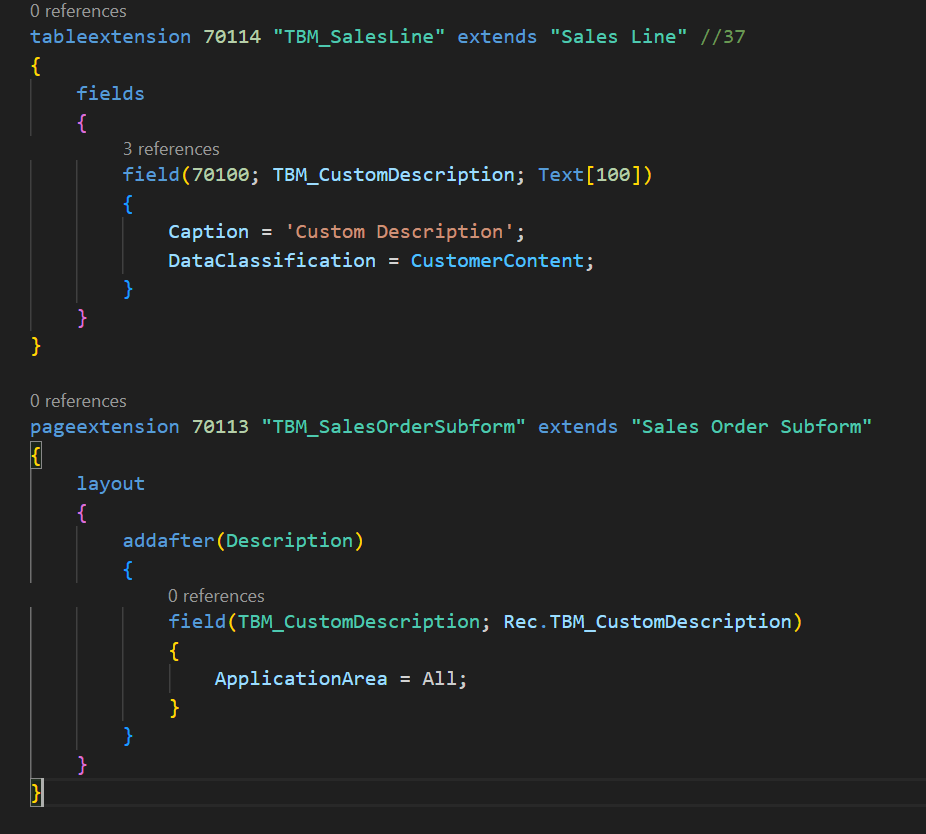
1. Let’s add a new field to the Sales Line table / page for a Custom Description.
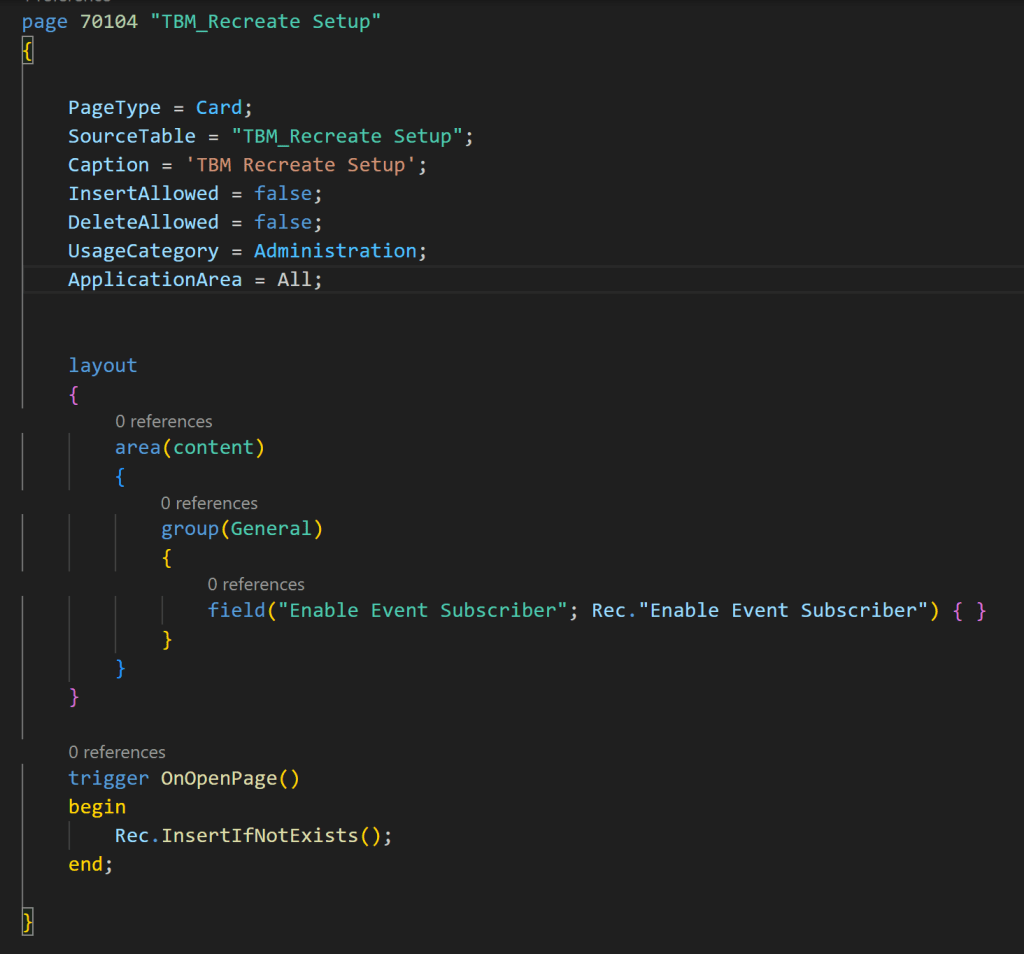
2. Then let’s create a “TBM Recreate Setup” table / page, where I have a boolean to “Enable Event Subscriber”. That way we don’t have to worry about republishing code.
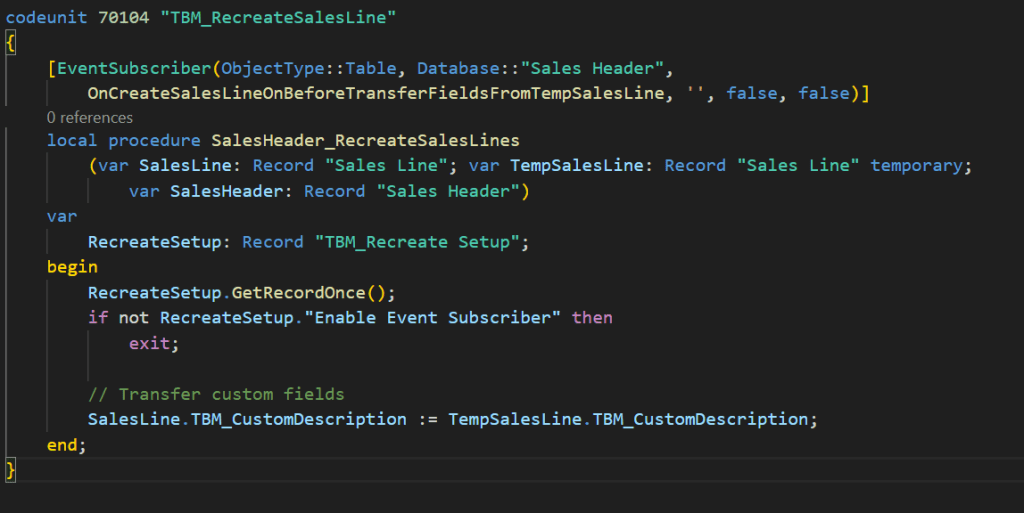
3. Time to create our event subscriber.
I’m going to get my setup record. If “Enable Event Subscriber” is false, I’m going to exit (and not copy my Custom Description). Otherwise, I will copy the Custom Description from the TempSalesLine to the “new” Sales Line.
Now to test this in Business Central…
- Create a Sales Order, populating the standard fields.
- Create a Sales Line, and populate the new Custom Description field.
- Change the Ship-to on the Sales Order.
- You will get a confirmation that you will need to recreate the Sales Lines; click Yes.
- Since our “Enable Event Subscriber is set to false, your Custom Description should have been cleared out on the Sales Line (which is the default behavior if you do not subscribe to the Event Subscriber)
Now let’s test using the Event Subscriber
- Populate the Custom Description Field.
- Navigate to the Recreate Setup page, and set the “Enable Event Subscriber to true.
- Back on the Sales Order, change the Ship-to Code
- This will trigger recreating the Sales Line, where we will say Yes.
- This time our event subscriber code should trigger, copying the value of the TempSalesLine Custom Description to the Sales Line Custom Description.
You can watch a video demo of this in action within Business Central below.
Hopefully this #HumpDayHacks post will save you a lot of headaches with your integration projects. Feel free to reference my code example here.
#msdyn365bc #BusinessCentral
 BC Development Notebook