Last week we had a fairly straight-forward request to add the “Address 2” field to the Ship-To Address drop down. Microsoft Learn documentation describes Field Groups as table or table extension objects used to define the fields to display in a drop-down control on pages that use the table.
I am all for improving efficiency within Business Central, and this new feature in Business Central 2023 release wave 2 (coming in October) is at the top of my list for new features I am excited about!
My goal with this blog is to fill some of the gaps on documentation within the Business Central community. If you are new to developing in AL, I am glad you are here! Maybe you are a seasoned NAV or BC developer who needs a refresher on how to setup your workstation. In that case, I am happy to help! Overall, this will be a guide of some of the “essentials” for developing in AL for Business Central.
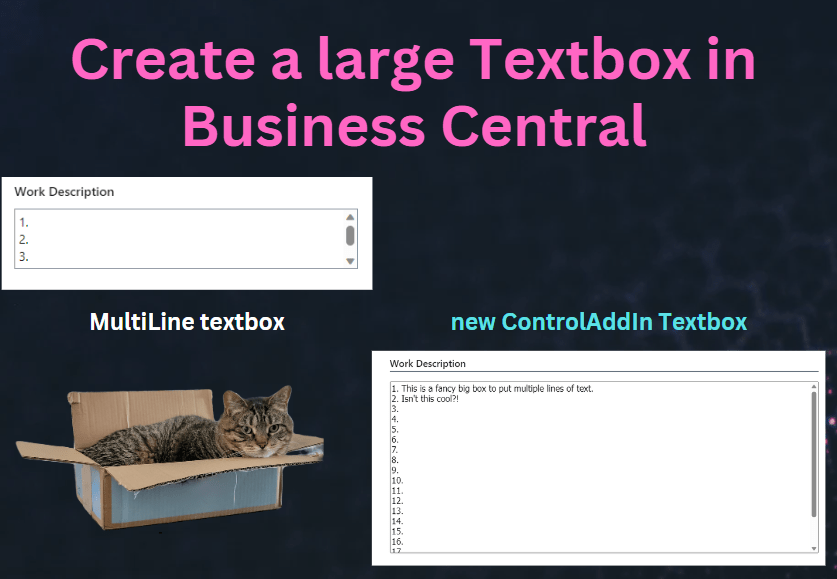
If you have worked with Business Central, I’m sure you have added a field to a page with the property MultiLine = true The problem is that you are limited to only 3 lines of text before you get a scroll bar. This can be annoying to a user, as they have to scroll to see all of their text. We can use a controladdin from Microsoft to “embed” our own textbox, meaning we can make it however big we want it.
Views are used on List Pages to define different ways of organizing data. Instead of creating a new custom page to reorganize the data, you could create a View that will rearrange the columns. The great thing about creating a view via AL code is that it is available to all users.
I had the honor of presenting at DynamicsCon Live in Scottsdale, Arizona about one of the newer features in Business Central. You can now create and run Excel Report Layouts from Business Central (without any apps or custom code!)
Excel is the most popular spreadsheet system. At one point in time we all probably listed “proficient in Excel” on our resumes. Now is the time to dust up on all the functions and advanced processing capabilities within Excel to slice and dice your data from BC.
Excel Report Layouts were introduced in Business Central version 2022 Wave 1 (BC20).