

A query object is used to collect and read data from Business Central. The data will always be retrieved from SQL, meaning that you may not get the dynamic data that is currently in the middle of being processed. What makes a query object more powerful than reading from a table object is the ability to join multiple tables in one “dataset”.
We can specify the SQLJoinType to define how data from different tables is combined.
Joins
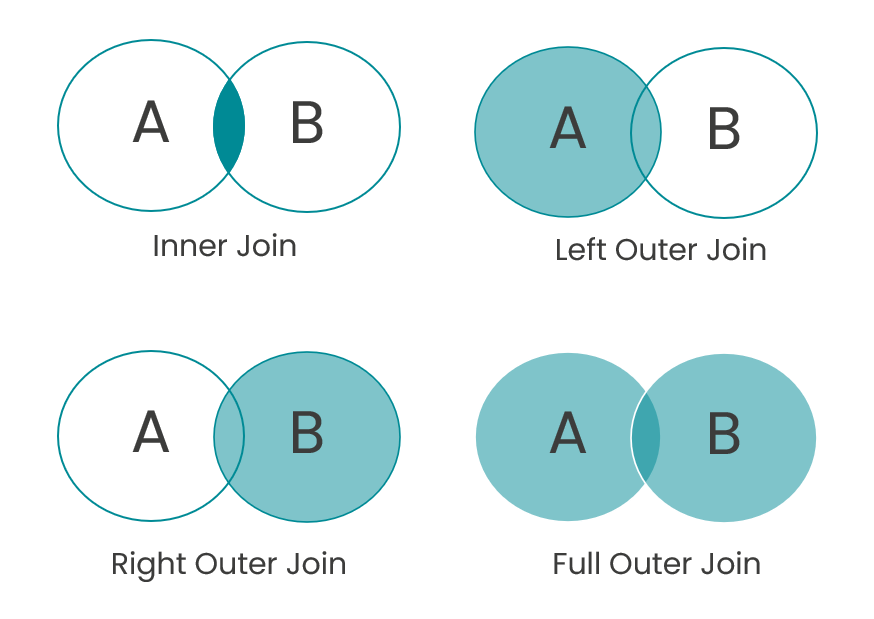
- Inner Join: only returns rows where there is a match in both tables.
- Scenario: Customers who have an outstanding balance. You can get the customer contact information from the Customer table, and get their Remaining Amount from the Item Ledger Entries.
- Left Outer Join: returns all rows from the left table, and the matched rows from the right table. If there is no match, the result is NULL on the right side of the table.
- Scenario: You want a list of all Customers, along with the Sales Order Nos. they have placed. You may have prospects who haven’t placed orders yet, so this SQLJoinType would return all Customers.
- Right Outer Join: returns all rows from the right table, and the matched rows from the left table. If there is no match, the result is NULL on the left side of the table.
- Full Outer Join: returns all rows when there is a match in one of the tables. The result is NULL when unmatched on either side. This would return a complete dataset.
- Scenario: think of Customers and their Salespeople. Maybe there are Customers who haven’t been assigned a Sales Rep, or someone hasn’t worked with Customers yet. This would show you all Customers and all Sales Reps.
- Cross Join: returns the Cartesian product of the two tables, meaning it combines all rows from the first table with all rows from the second table. I tend to think of this as an “all possible scenario” type of dataset.
- Scenario: Building something like the Item Availability by Location matrix could be something fun to put together with a CrossJoin because you would be showing all Item Inventory possibilities with all Locations.
Query Usage Scenarios
So when would we use a query object when developing for Business Central?
- When we need to collect data from multiple sources
- Run a query directly for Data Analysis
- Show data from multiple tables
- Toggle Analyze Data to complete further aggregation (think grouping, subtotals and totals)
- Learn more about the Data Analysis feature here
- Use to populate a report dataset (psst: check for another blog post coming soon!)
- Use as a data source for a page – You will just need to copy the data from the query to a temporary table that is the SourceTable for the page.
- Think of this as a faster way to collect the data, and make it a navigation hub to dig deeper into master data.
- Expose as a web service / use as an API
- You can create a query with a QueryType=API
💡 Use AZ AL Dev Tools extension within VS Code to use the New AL File Wizard to quickly create new objects with a UI to guide you through populating the necessary properties.
💡 Otherwise usetquery(and select API) to get a template for creating a Query API object. - You can learn more about creating Query APIs here
- You can create a query with a QueryType=API
As someone with roots in database development, I absolutely love being able to leverage queries in my Business Central Development. Have you started writing queries yet? What questions do you have?
 BC Development Notebook
[…] my explanation isn’t working for you, please check out the BC Development Notebook by Tonya Bricco-Meske. Tonya (or her cat, I’m not 100% sure who writes the blog) has a great […]
LikeLike