
Have you ever wondered which apps are listening to specific events in Business Central? Or maybe you’re troubleshooting why something is behaving unexpectedly. There is a hidden page that is going to change your debugging style…
Page 9510 – Event Subscriptions
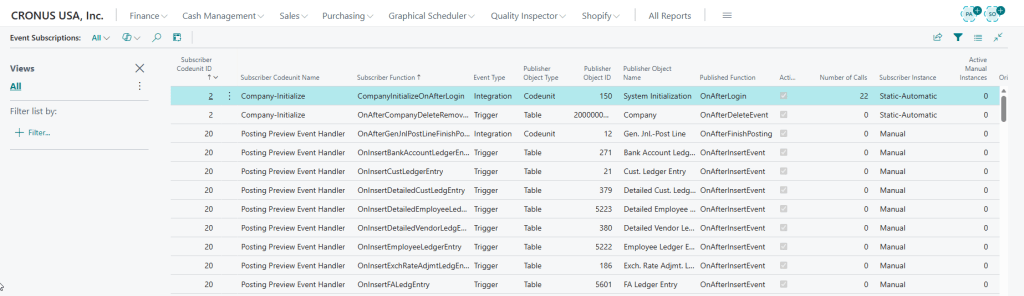
This page lists all event subscriptions across all installed apps. You will see
- Subscriber Codeunit Name: The name of the codeunit that contains the event subscriber function.
- Subscriber Function: The name of the function subscribing to the event
- Event Publisher Name: The event being listened to.
- Publisher Object Type: The type of object that contains the event publisher function.
- Publisher Object ID / Name: The Object ID / Name that contains the event publisher function.
- Published Function: The name of the event publisher function that the event subscriber function is subscribing to.
- Originating App Name: Which app owns the subscriber.
This is especially helpful when debugging or auditing dependencies before an upgrade.
🪄 This is a magical, hidden page, that you cannot find through Tell Me. You will need to append the page id to the end of your Business Central URL.
https://businesscentral.dynamics.com/TenantID/EnvironmentName/?page=9510
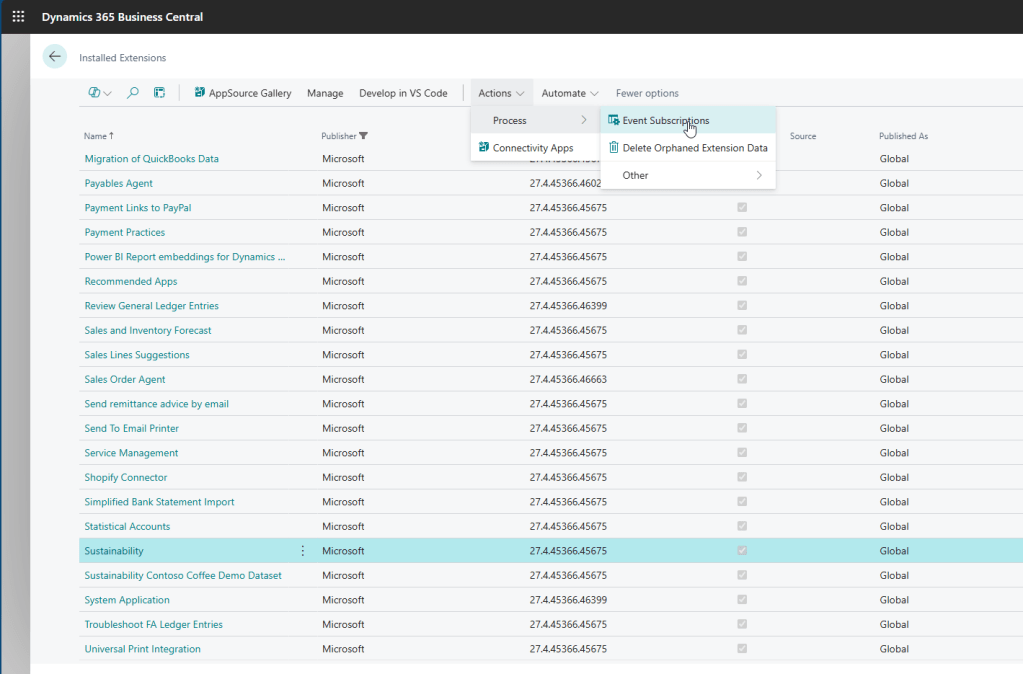
You can also access this page from Extension Management. For example, if you were to highlight the Sustainability app from Microsoft, and navigate to the Actions > Process > Event Subscriptions, you would see all of the Event Subscriptions that are a part of this app package.
Why is this important?
The Event Subscription page shows you all of the Event Subscribers that are a part of that app offering. You can see how many different events are being triggered by a specific app. If you remove the filters for the “Originating Package ID” you would see all Event Subscribers, and you can see how many different apps are being triggered at the same time.
This is where App Maintenance is key. If there is functionality not being used (for example, Sustainability), then you could uninstall the app, and reduce some of the events being hit.
Use Cases
You are testing some functionality, and somehow get stuck inside a loop, and cannot figure out what is going on. If you look at the code that is running, and see some event publishers, you can easily identify other apps that may be colliding with your code. We recently were able to identify an app that we thought might be a culprit, uninstalled in our sandbox, and the process resumed working as expected.
Imagine you’ve subscribed to the most used event subscriber OnAfterPostSalesDoc. Your code works as expected. Another app gets installed, and all of a sudden your code isn’t getting run anymore. By checking Page 9510, you can quickly identify other apps subscribing to the same event and can start making plans on how all of the apps can work cohesively together in the same environment.
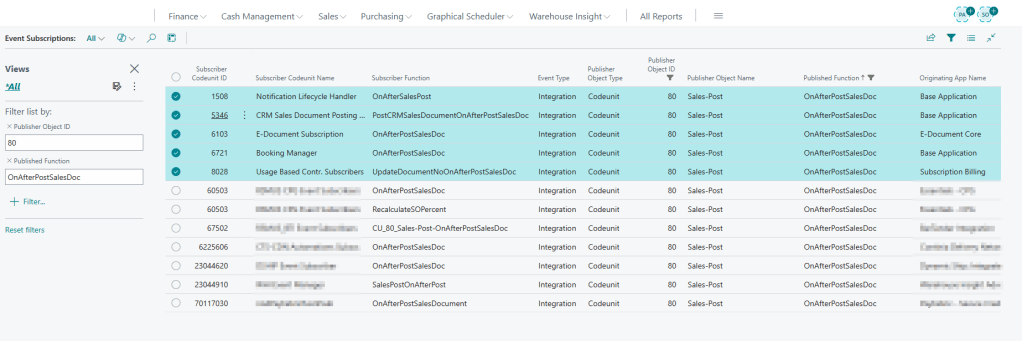
In the image above you see the Subscriber Function is filtered for OnAfterPostSalesDoc. The first five apps are all from Microsoft. The remaining event subscribers are from PTEs or AppSource Apps.
Other Additional Fields
There are other fields that are displayed on the Event Subscription page that you may not use as frequently, but are still helpful on your debugging journey.
There is a Subscriber Instance that indicates if an event subscriber is Static-Automatic, or Manual. If you are unfamiliar with manual event subscription, check out Brad Prendergast’s blog here
You can also see the Number of Calls on the Event Subscription page. This specifies how many times the event subscriber function has been called within the current session. The event subscriber function is called when the published event is raised in the application.
Why It Matters
Event subscriptions are the backbone of extensibility in Business Central. They allow apps and extensions to hook into standard processes without modifying base code. But when something goes wrong, like an event firing twice or not at all, knowing who’s subscribed is critical.
 BC Development Notebook
Fantastic! I can’t believe I ever lived without this.
Thank you for sharing!
LikeLike
You replied to this comment.
LikeLike
The table is 2000000140, while the page is 9510.
LikeLike
My bad! I got my wires crossed!
LikeLike
[…] You can read Tonya’s post here: #HumpDayHacks: Event Subscriptions Page in BC – BC Development Notebook […]
LikeLike