

Our first approach to reusable GitHub Copilot workflows was a library of reusable prompt files. You can read about my reusable prompt strategy in GitHub Copilot Playbook: Reusable Prompts. Each prompt represented a specific Business Central development task, such as extending Sales Lines or adding fields to a page. This worked well if the correct prompt was selected. The challenge was knowing which prompt to use (or if one even existed), understanding naming conventions and parameters, and choosing the right one for your implementation.
As the library grew to more than 50 custom prompts, the challenge was ensuring developers had the right prompt at their fingertips. Developers needed a way to find the right workflow without memorizing filenames, naming conventions, or prompt parameters. That raised a new question: how could we keep prompts specialized while making them easier to discover?
Why Prompts need a Routing Layer
A prompt such as our salesLineTableExt contains details for one specific document family:
- Extend the Sales Line table and its posted and archived equivalents
- Preserve a consistent field number
- Then continue to implement the corresponding page extension prompt
We didn’t want to convert this with one enormous generalized prompt full of conditional logic to implement a variety of table extension implementations. Instead, we are introducing a skill that will “sit” above the prompt library.
Skills Become the Discovery Layer
Let’s create a bc-table-extension skill to define the request and route the implementation to the appropriate prompt.
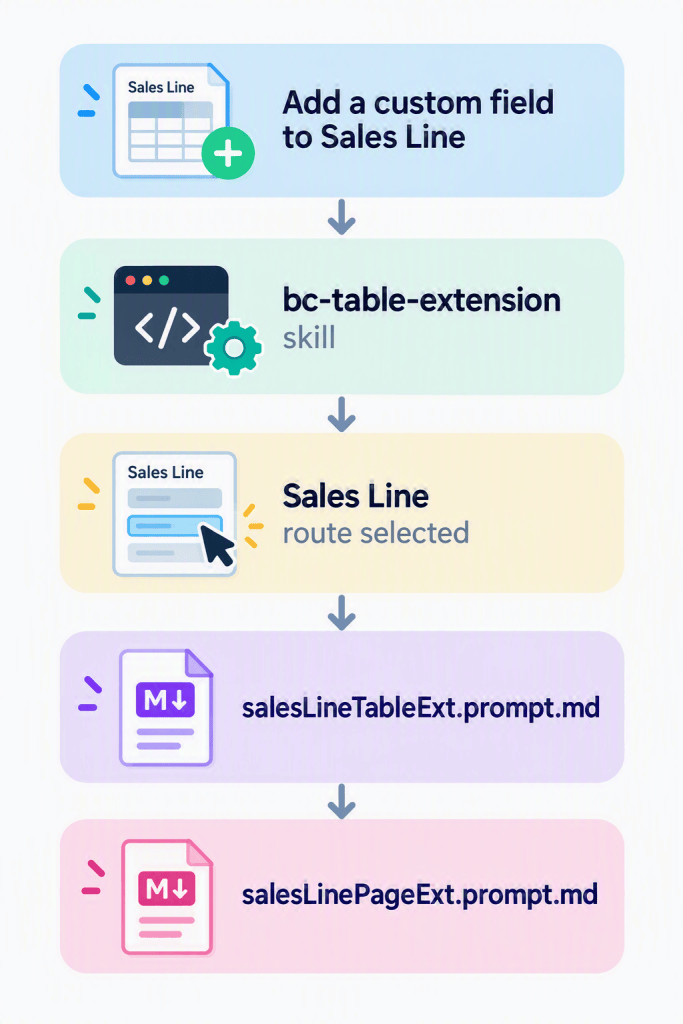
The skill itself is another markdown file that includes the following information:
- A natural-language description that helps Copilot understand when the skill should be applied
- A routing table that is organized by document family
- A generic fallback for tables without a dedicated prompt
- Special instructions that help select the correct workflow and requirements that the selected prompt **MUST** be read in full.
---name: bc-table-extensiondescription: Routes table extension tasks to the correct prompt for each BC document family. Use when creating or updating Business Central table extensions, fields, or related posted and archive tables.---# BC Table Extension Skill## PurposeRoute table extension tasks to the correct prompt. Prefix resolution and field rules are handled automatically by the instruction files that apply to all TableExt prompts — this skill is purely a routing guide.## Required Execution ContractAfter selecting a prompt from the routing table:1. **MUST read the selected prompt file in full** using the available file-reading tool before planning or editing.2. **MUST follow every instruction in that prompt**; do not implement from this routing summary alone.3. **MUST read and follow any prompt that the selected prompt chains to**, including its matching PageExt prompt.4. Preserve the selected prompt's required inputs, confirmation points, sequencing, and validation steps.5. If a linked prompt cannot be read, stop and report the missing or inaccessible file instead of approximating its instructions.The routing table identifies the correct file; it does not replace that file's instructions.> Each prompt also chains to its matching **PageExt** prompt automatically after completing the table extensions.---## Prompt Routing — Choose the Right PromptUse the table below to identify which prompt to run.### Sales| Target family | Prompt file ||---------------|-------------|| Sales Header (+ Shipment/Invoice/Cr.Memo/Archive/Return Receipt Headers) | [salesHeaderTableExt.prompt.md](../../prompts/salesHeaderTableExt.prompt.md) || Sales Line (+ Shipment/Invoice/Cr.Memo/Archive/Return Receipt Lines) | [salesLineTableExt.prompt.md](../../prompts/salesLineTableExt.prompt.md) |> **Sales Line special rule:** When adding a field to Sales Line, you must also update the `OnCreateSalesLineOnBeforeTransferFieldsFromTempSalesLine` event subscriber to transfer the custom field. The prompt handles this — do not skip it.### Purchase| Target family | Prompt file ||---------------|-------------|| Purchase Header (+ Rcpt/Inv/Cr.Memo Headers + Archive) | [purchaseHeaderTableExt.prompt.md](../../prompts/purchaseHeaderTableExt.prompt.md) || Purchase Line (+ Archive/Rcpt/Inv/Cr.Memo Lines) | [purchaseLineTableExt.prompt.md](../../prompts/purchaseLineTableExt.prompt.md) |## **Continue Adding more prompts here**## Validation & ChecklistBefore merging table extensions, verify:- ✓ Same field number used across all tables- ✓ Field name includes {{Prefix}} prefix, no spaces- ✓ Caption is auto-generated or provided (not blank)- ✓ ToolTip is user-facing and concise (not a duplicate of Caption)- ✓ DataClassification is set appropriately- ✓ No duplicate fields on any table- ✓ All table extensions have unique ObjectIDs- ✓ ObjectIDs in {{Prefix}} range, no conflicts- ✓ Project builds without errors- ✓ Field appears in Table Designer with correct metadata## Business Central AL–Specific Cautions### Field Naming- **Prefix**: Always include {{Prefix}} in the field name (e.g., `"{{Prefix}}RequestedDeliveryDate"`)### Field Numbers- **Consistency**: Use the **same field number** across related tables- **Range**: Keep field numbers in your {{Prefix}} range## Related GuidanceFor detailed table extension standards, see:- [tableext-rules.instructions.md](../../instructions/tableext-rules.instructions.md) — field naming and numbering rules- [prefix-resolution.instructions.md](../../instructions/prefix-resolution.instructions.md) — naming conventions- [repo.instructions.md](../../instructions/repo.instructions.md) — workspace standards- [bc-page-extension](../bc-page-extension/SKILL.md) — page routing, if you need to run a PageExt prompt on its own
The prompts still own the detailed implementation details. The skill makes the implementation procedure discoverable.
Why Referencing the Prompt is Not Enough
When we started writing our skill files, we realized that the markdown file was telling an agent where a prompt was located but it did not guarantee that the linked file would be loaded into context.
We then added some reinforcement to the skill to include a more explicit contract.
- Select the appropriate prompt.
- Read the selected prompt file in full.
- Follow every instruction in the prompt.
- Follow any chained prompts.
- Stop if a required file cannot be accessed.
These reinforcements prevent the agent from implementing a task only based on the shortened routing, its prior knowledge, or hallucinating.
Why the Evolution
We didn’t convert the prompts into skills. Instead we retained the prompts so AI adoption could evolve. We have preserved the existing prompt behavior, the ability to directly call a prompt, specialized workflows, as well as existing prompt-to-prompt chaining.
Migration Steps
- Group related prompts into task families
- Create one skill for each family
- Add routing tables from task type to prompt file
- Add explicit prompt-loading requirements
- Move repetitive rules into instruction files
Separating Responsibilities
Our new architecture has four distinct layers:
| Layer | Responsibility |
| Instructions | Shared rules applied automatically. |
| Skills | Discover and route the requested workflow. |
| Prompts | Executes a specific task. |
| Agents | Handles broader, multi-step roles. |
Shared standards, such as field numbering, captions, object IDs and naming conventions live in our tableext-rules.instructions.md. This avoids having to copy the same information into every skill or prompt.
This gives each layer a clear purpose. Instructions define policy. Skills choose the workflow. Prompts perform the workflow. Agents coordinate broader responsibilities.
What We Gained
By adding a routing layer instead of replacing the execution layer, we gained several practical advantages.
- Developers can describe the task instead of remembering filenames
- Copilot loads the routing knowledge only when relevant
- Specialized prompts remain small and focused
- Shared standards have one source of truth
- New prompts become discoverable by adding one routing entry
- Existing workflows can continue to be called directly
Skills haven’t replaced our reusable prompts. Skills make the prompt library discoverable and easier to be used in the AI workflow.

